







What is the Search Function?
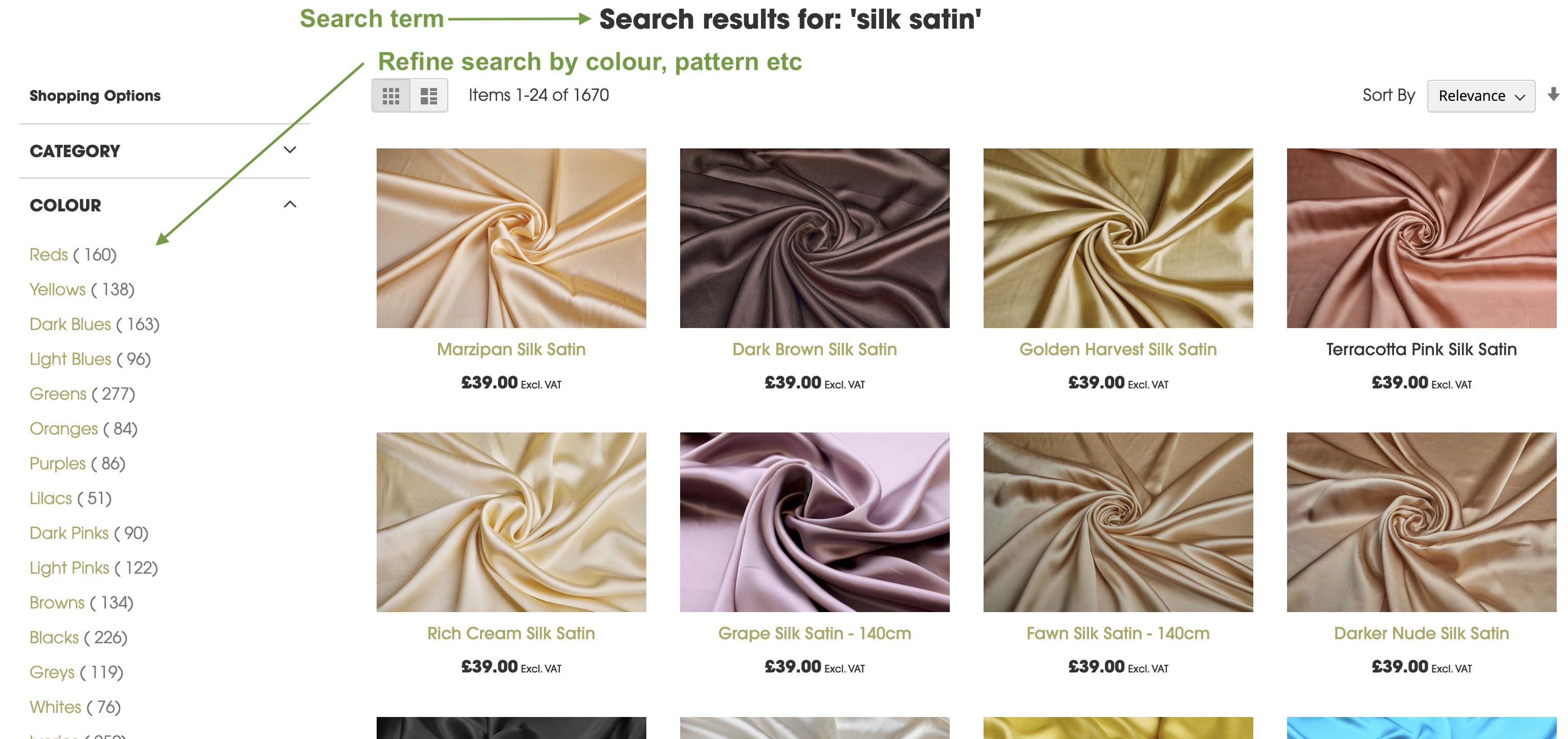
The search function is an interactive tool—often represented by a search box or magnifying glass icon—where users type in keywords or phrases to find specific content. Our website then returns a list of results that match those terms, much like a mini search engine for that particular site. This function is great if you have the stock code (SKU) for the item tyou're looking for, or if your search is more generic, i.e, "blue" or "dupion". When you enter "dupion, the results will include plain, printed, embroidered etc, and you can use the side navigation to narrow down your search, by colour, pattern, embellishment etc.
Search is best when you have a clear, specific need. For example, looking up a product by its stock code or exact name, or when looking for any fabric in a colour.
The biggest issue with the search function is that if you enter more than one word, say "striped blue silk dupion", the results will show you the most relevant results for those words, as well as anything that has the words "striped", "blue", "silk" and "dupion' in it.
Instead, it would be better to use the navigation to go to All Fabrics > Silk Fabrics > Silk Dupion and from there use theside navigation to select Colour - Blue and Pattern - Stripe, this will show you all blue striped silk dupions:

Another issue would be misspelling, or other spellings or words for the same fabric, like "dupion" in British English and "Doupioni" or even "Douppioni" in American English, or the French "Mousseline" for chiffon. The site won't necessarily account for these things.
We have a search synonyms function so we *can* account for naming differences. If you have a search that garners no results when it should, please let us know.
What is Website Navigation?
Website navigation refers to the menus and structural elements that guide users through a site. This includes the main menu at the top of a page, sidebars, footers, breadcrumbs, and often even image-based links on a homepage. Navigation gives structure to a website, laying out the hierarchy and relationship between pages and sections.
Key aspects of navigation include:
· Consistency: Navigation menus are usually visible on every page, helping users orient themselves and move around easily.
· Hierarchy: Well-designed navigation reveals the structure of the site, showing how pages are grouped and what content is most important.
· Discovery: Navigation encourages users to explore, making it easier for them to find information they didn’t even know they were looking for.
When to Use Navigation
Navigation shines when you are exploring a website or don’t have a specific goal in mind. It’s perfect for:
- · Browsing categories of products on an online store
- · Getting familiar with the structure of a company’s services or offerings
- · Discovering related content, such as blog posts, topics, or resources
- · Understanding the hierarchy and organization of information
Navigation is also critical for first-time visitors who need to get a sense of what’s available. Menus, drop-downs, and organized links provide a roadmap of the site and introduce users to areas they might not have thought to search for.
Advantages and Drawbacks of Each Method
Navigation Pros:
- · Guides users through the site structure and content
- · Encourages exploration and discovery
- · Helps new visitors understand what the site offers
- · Usually available and visible on every page
Navigation Cons:
- · Can become overwhelming if menus are cluttered or poorly organized
- · Might not offer direct access to less prominent content
- · Not as efficient for finding specific items quickly
Search Pros:
- · Fast and direct for users who know what they want
- · Can find content buried deep in the site
Search Cons:
- · Relies on precise keywords—spelling errors or vague terms might yield poor results
- · Can return too many or irrelevant results if not well-implemented
- · Less effective for users interested in browsing or discovering new content
How Search and Navigation Work Together
The best websites balance both navigation and search, recognising that users have varying needs depending on where they are in their journey.
Both site navigation and the search function are essential tools for helping users find products on our site.
Navigation supports more accurate discovery, while search provides a more open result, which can then be filtered using the side navigation.